Lineup Club · Web dashboard
The big screen for running your club.
The app runs your teams from the touchline. The web dashboard is where the work that needs a keyboard happens — designing training drills, building matchday graphics, and seeing every team, every fixture and every member in one place.
Included with Lineup Pro · Works with the app your teams already use
Northfield FC
5 teams · Kings Park, Horsham
Teams
+ Add teamFirst Team
Adult · Division 2
Reserves
Adult · Division 5
U14 Colts
U14 · Youth league
U12 Colts
U12 · Youth league
Vets
Adult · Friendly
Built for the person running it all.
Club secretaries, chairpeople, managers and coaches — this one's for you.
The drill builder
Design a training drill on a pitch measured in real metres, tilt it to the view you get from the touchline, and animate the runs frame by frame. Export a still for the clipboard or a video for the team chat.
Learn more
The graphics editor
Every matchday poster the app can make, on a canvas the size of your screen — themes side by side, floating panels, and the same saved posters as the app, so a graphic started here finishes on your phone.
Learn more
Team chat, from a keyboard
The same conversations as the app — team, group and direct messages, photos and polls — with a proper keyboard under your hands for the long ones.
Learn more
A club-wide schedule
Every fixture and training session across every team, in one view. See what the whole club is doing this weekend without opening five different calendars.
Every team, one club
Group the first team, the youth sides and the vets under one club badge. Create new teams or bring in existing ones — each keeps its own fixtures, chat and identity.
The whole-club roster
Everyone across all your teams in one searchable list — including who plays for more than one squad. No more cross-referencing team sheets.
Shared club admin
Promote trusted people to club admin so running the club never falls on one person. Owners stay in control of who has the keys.
Session plansComing soon
A whole training session on a clock — arrival, warm-up, practice, small-sided game, match — with your own drills slotted in, ready to attach to a training fixture and send to the squad.
Multi-team tournamentsComing soon
Run tournaments and events across your teams from the dashboard — one setup, every squad involved, no spreadsheet juggling.
Made for a big screen
Two editors you won't find on a phone.
Everything else on Lineup fits in your pocket. These two need room — so they live on the dashboard, and everything they make lands straight back in the app.
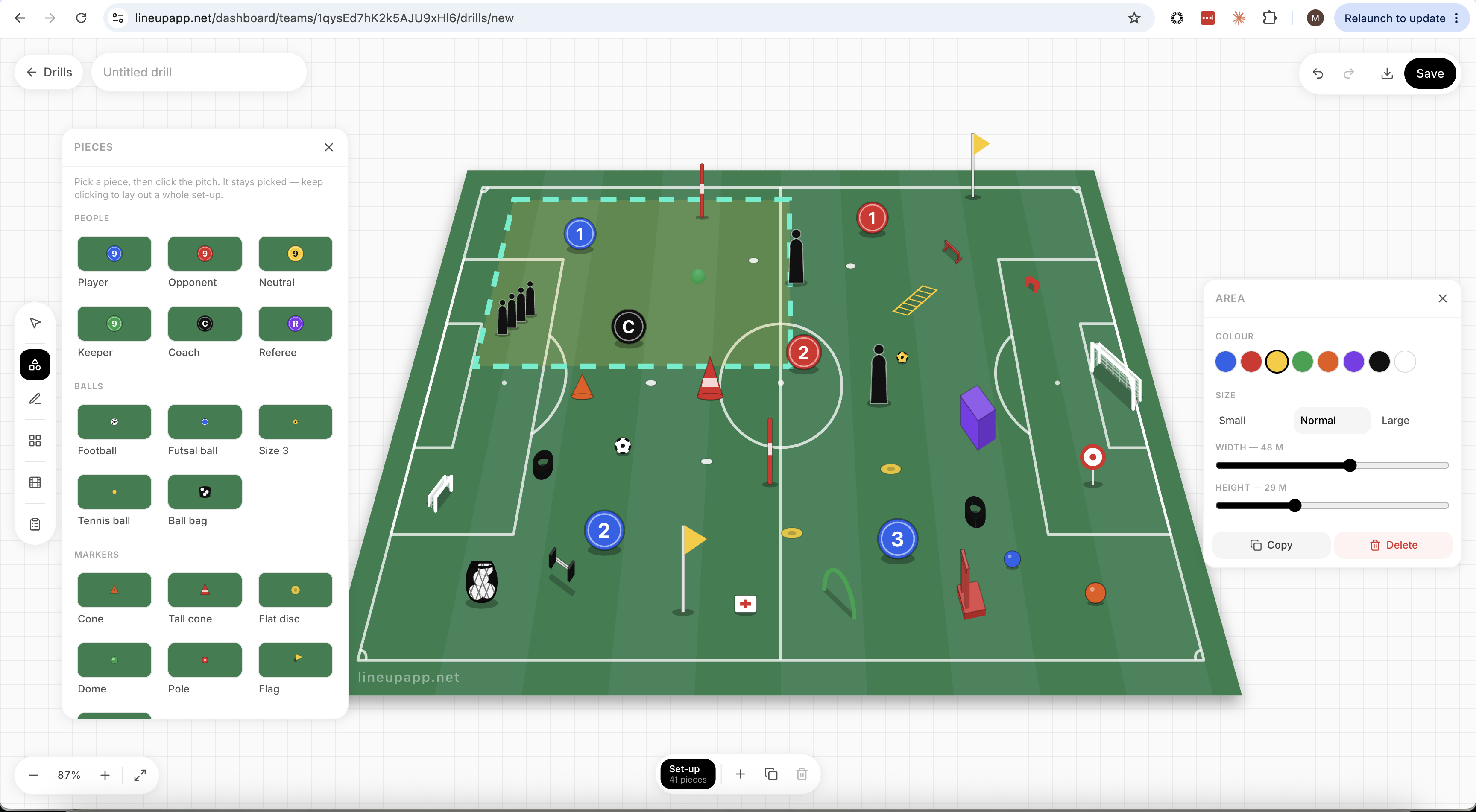
The drill builder
A blank pitch and a proper set of tools, in the same place as your fixtures and your squad. Lay your drill out, add a frame, move the players, press play.
Explore the drill builder- Seven pitches, all measured in real metres
- Forty-five pieces, from cones to mannequins
- Flat plan view or the angled touchline view
- Run, pass and dribble arrows
- Frame-by-frame animation
- PNG for the clipboard, MP4 for the chat
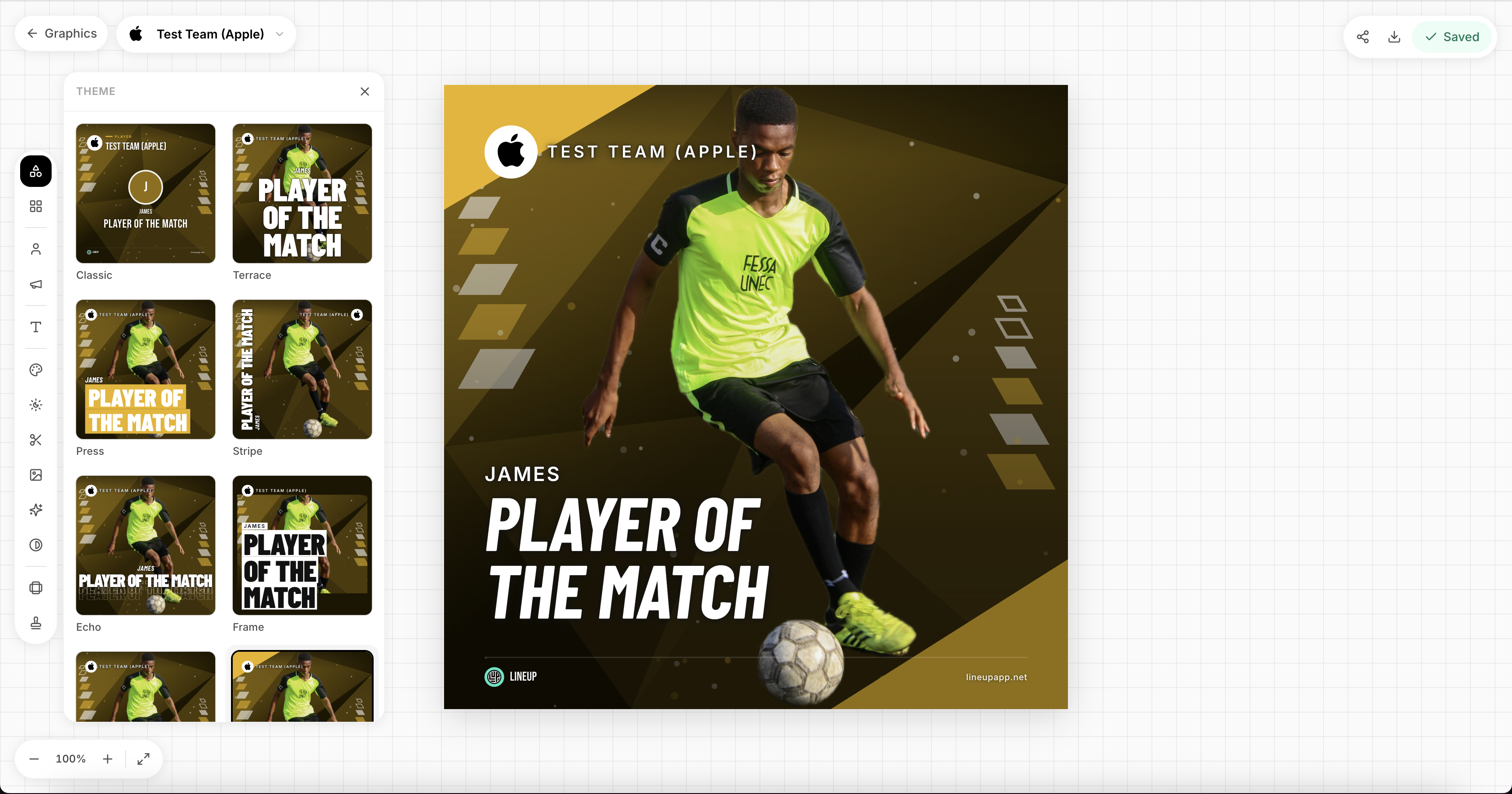
The graphics editor
The app’s matchday graphics with the whole screen to work on — saving to the same place as the app, so nothing is trapped on one device.
Explore matchday graphics- Every theme, side by side
- Scores, scorers and squad filled in from the fixture
- Square, story and landscape
- Your colours, your badge, your photos
- Switch between teams without leaving the editor
- Saves to the same place as the app
Getting started
From teams to club in an afternoon.
- 1
Create your club
Sign in to the web dashboard, create your club and give it a badge and home ground.
- 2
Add your teams
Bring in the teams you already run on Lineup or create new ones — each keeps its own squad and schedule.
- 3
Share the admin
Promote fellow organisers to club admin, and run the season together from one dashboard.
- Included with Lineup Pro
- No new logins for your squads
- Live data from the app
Lineup Club, answered.
Bring your club together.
Start your Lineup Pro trial, scan the QR code to sign in, and build your first drill before training on Tuesday.